Top Level Report
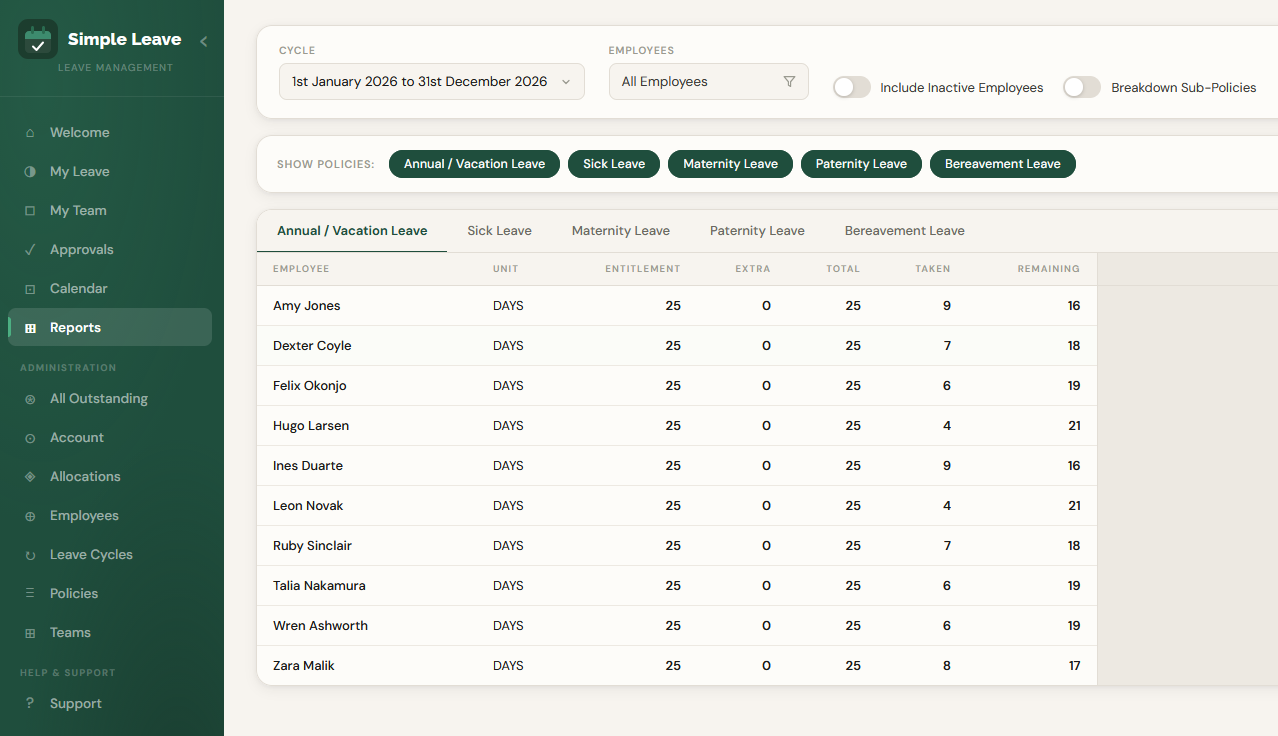
The Top Level Report gives you an organisation-wide view of leave — one row per employee, broken down by leave policy, for a chosen leave cycle. It's the fastest way to see entitlement, usage and remaining balances across your whole team at a glance.
Who Can View This Report
- Administrators see every employee in the organisation.
- Managers see their direct reports.
- Employees without admin or manager access cannot view this report.
Filtering the Report
At the top of the report you can control exactly who and what the report covers:
- Cycle — choose which leave cycle to report on. Defaults to the current cycle.
- Employees — click the filter button to narrow the report down to specific employees or teams. Leave it unfiltered to see everyone you have access to.
- Include Inactive Employees — off by default. Turn this on to include employees who have left the organisation.
- Breakdown Sub-Policies — some leave policies have multiple sub-types (for example, different codes under "Annual Leave"). Turn this on to break totals down by sub-policy instead of showing a single combined figure.
Reading the Table
Each leave policy has its own tab, so you only see one policy's figures at a time — click between tabs (e.g. Sick Leave, Maternity Leave) to switch.
The columns shown depend on how that policy is configured:
| Column | Meaning |
|---|---|
| Unit | The unit leave is tracked in for this policy, e.g. DAYS. |
| Entitlement | The employee's base entitlement for the cycle. |
| Extra | Any additional entitlement manually added (e.g. carried-over days). |
| Total | Entitlement + Extra — the total amount available for the cycle. |
| Taken | How much leave has been used (includes both pending and approved requests). |
| Remaining | Total minus Taken. |
Policies configured as Keep Count (rather than Track Entitlement) don't track a balance, so only the Unit and Taken columns are shown for that policy — there's nothing to subtract from.
Use this report at the start of a new leave cycle to sanity-check that entitlements were carried over or set up correctly for everyone, and throughout the year to keep an eye on who's built up a large remaining balance.
Related Pages
- Leave Policies — how policies and their sub-codes are configured.
- Managing Allocations — how entitlement, extra and carried-over leave are set for each employee.
- Individual Report — drill into a single employee's history.